
In this article, I describe creating a top navigation bar in a .NET 8 Blazor Web App with a sidebar menu that can be toggled. This is accomplished using MudBlazor .

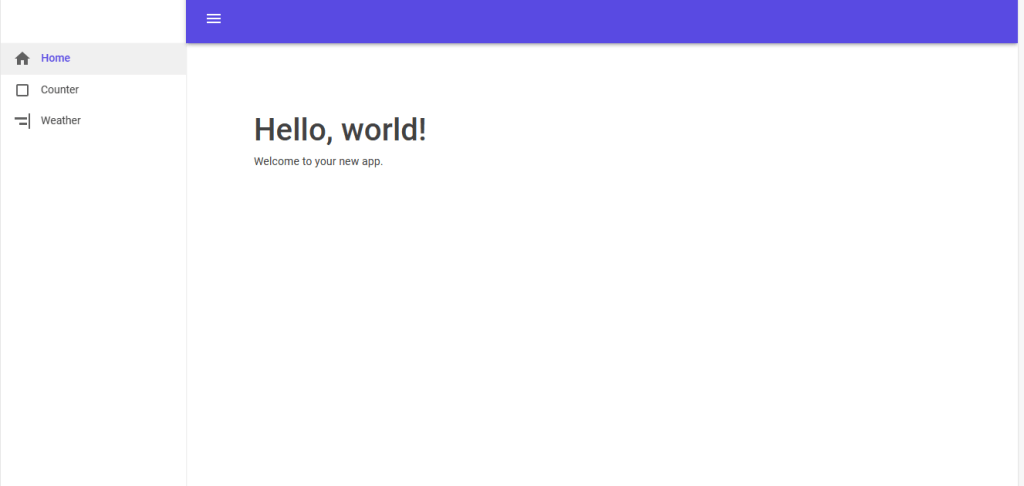
I created a .NET 8 Blazor Web App. The first step was to install the MudBlazor NuGet package.
The MudBlazor getting started instructions work for a .NET 8 Web App. I am including them for completeness.
Add @using MudBlazor to _Imports.razor
In App.razor add this to the stylesheet section.
    <link href="https://fonts.googleapis.com/css?family=Roboto:300,400,500,700&display=swap" rel="stylesheet" />
    <link href="_content/MudBlazor/MudBlazor.min.css" rel="stylesheet" />
Also in App.razor, add this to the script section.
http://_content/MudBlazor/MudBlazor.min.jsIn Program.cs add builder.Services.AddMudServices()
Add <MudThemeProvider /> to MainLayout.razor
A web component in Blazor with button functionality needs a render mode. I chose render mode Interactive Server. This requires an addition in Program.cs after AddRazorComponents()
builder.Services.AddRazorComponents()
    .AddInteractiveServerComponents();
To get a button to work in a top navigation bar, I needed to add a render mode that work in MainLayout.razor. I accomplished this by changed the <Routes/> tag in App.razor.
<Routes @rendermode="@RenderMode.InteractiveServer" />I used the <MudLayout> component for the layout in MainLayout.razor.
I created two components, one for the top navigation bar and one for the side menu.
The top navigation bar, which I call AppBar.razor, contains a MudAppBar.
<MudAppBar Color="Color.Primary" Fixed="false" Elevation="3">
    <MudIconButton Icon="@Icons.Material.Filled.Menu" Color="Color.Inherit" Edge="Edge.Start" OnClick="ToggleDrawer" />
</MudAppBar>
AppBar.razor is a child component of MainLayout.razor. That means that the OnClick event has to invoke an EventCallback. The EventCallback has to be a parameter in AppBar.razor.
@code {
    [Parameter]
    public EventCallback OnSidebarToggled { get; set; }


    async Task ToggleDrawer()
    {
        await OnSidebarToggled.InvokeAsync();
    }
}
The sidebar, DrawerMenu.razor is a MudDrawer with a parameter.
<MudDrawer @bind-Open="@Open" Elevation="1">
    <MudNavMenu>
        <MudNavLink Href="/" Match="NavLinkMatch.All" Icon="@Icons.Material.Filled.Home">Home</MudNavLink>
        <MudNavLink Href="/counter" Icon="@Icons.Material.Filled.CropSquare">Counter</MudNavLink>
        <MudNavLink Href="/weather" Icon="@Icons.Material.Filled.AlignHorizontalRight">Weather</MudNavLink>
    </MudNavMenu>
</MudDrawer>

@code {
    [Parameter]
    public bool Open { get; set; }
}
In MainLayout.razor, the EventCallback OnSidebarToggled is handled by a function OnSidebarToggledHandler.
<MudThemeProvider />
<MudLayout>
    <AppBar OnSidebarToggled="@SideBarToggledHandler" />
    <DrawerMenu Open="@toggle" />
    <MudMainContent Class="pt-16 px-16">
        <MudContainer Class="mt-6">
            @Body
        </MudContainer>
    </MudMainContent>
</MudLayout>

@code{
    private bool toggle = false;

    void SideBarToggledHandler()
    {
        toggle = !toggle;
    }
}
Since the parameter Open in the DrawerMenu is the private bool toggle, the button click in AppBar.razor opens and closes DrawerMenu.razor.
All of this results in a top navigation bar with a button that toggles a sidebar menu.



 Schroeder Consulting LLC