
This blog presents a MudBlazor application with a component. It is a Blazor web app. That means that each component can be either a server component or a web assembly component. This is determined by the render mode. The Home page of this application has no user interaction so it does not need a render mode.
The routing for the page is the @page directive. For the home page, this is just
@page "/"The page called be called from a navigation menu by
 <NavLink class="nav-link" href="" Match="NavLinkMatch.All">
     <span class="bi bi-house-door-fill-nav-menu" aria-hidden="true"></span> Home
 </NavLink>
The directive appear in the href.
This applications presents a list of TimeLineItems.
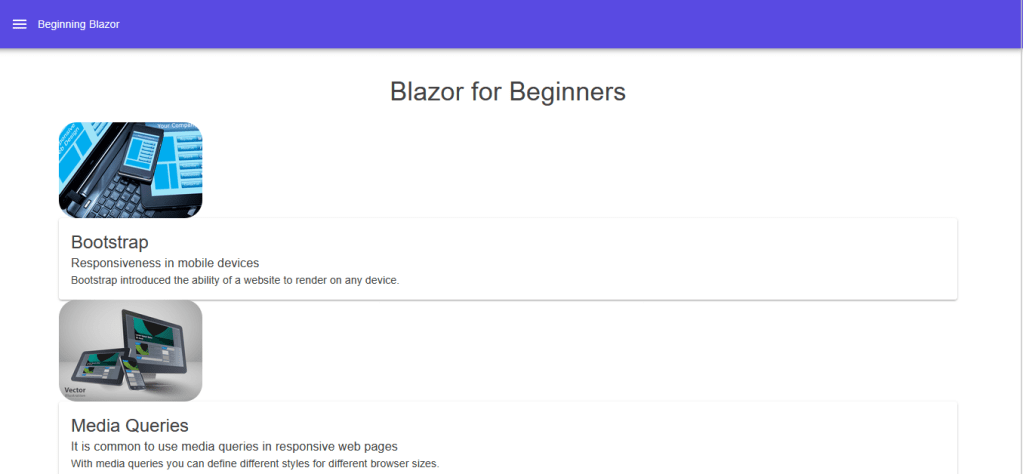
Each TimeLineItem is represented by a component. This component implements a TimeLineItem as a DemoModel.
 public class DemoModel
 {
     public string Header { get; set; }
     public string SubHeader { get; set; }
     public string Text { get; set; }
     public string ImageSrc { get; set; }
 }
Here is the component:
<MudImage Src="@ImageSrc" Width="190" Height="277" Fluid="true" ObjectFit="ObjectFit.Contain" Class="rounded-xl"></MudImage>
<MudCard>
    <MudCardContent>
        <MudText Typo="Typo.h5">@Header</MudText>
        <MudText Typo="Typo.body1">@SubHeader</MudText>
        <MudText Typo="Typo.body2">@Text</MudText>
    </MudCardContent>
</MudCard>


@code {
    [Parameter]
    public string Header { get; set; }
    [Parameter]
    public string SubHeader { get; set; }
    [Parameter]
    public string Text { get; set; }
    [Parameter]
    public string ImageSrc { get; set; }
}
For an TimeLineItem, the Header, SubHeader, Text and ImageSrc are variable. In Blazor syntax, we represent these as parameters. These parameters are specified in an instance of the component:
Here is the calling code from the Home page itself.
<Item ImageSrc="@i.ImageSrc" Header="@i.Header" SubHeader="@i.SubHeader" Text="@i.Text"></Item>The data for the TimeLineItems is provided by a service:
public Task> GetTimelineItems()
{
List items =
[
new DemoModel
{
ImageSrc = “/images/Responsive_1.jpg”,
Header = “Bootstrap”,
SubHeader = “Responsiveness in mobile devices”,
Text =
” Bootstrap introduced the ability of a website to render on any device.”
},
new DemoModel
{
ImageSrc = “/images/Responsive_2.jpg”,
Header = “Media Queries”,
SubHeader = “It is common to use media queries in responsive web pages”,
Text =
” With media queries you can define different styles for different browser sizes.”
},
];
return Task.FromResult(items);
}
Program.cs needs to dependency inject the service:
builder.Services.AddScoped<DataService>();The service must be injected into the Home page:
@inject DataService service
Here is the completed code:
<MudText Typo="Typo.h4" class="pb-5 pt-3 text-center">Blazor for Beginners</MudText>

@if (items == null)
{
    <p><em>Loading...</em></p>
}
else
{
        @foreach (var i in items)
        {
            <Item ImageSrc="@i.ImageSrc" Header="@i.Header" SubHeader="@i.SubHeader" Text="@i.Text"></Item>
        }

}

@code
{
    List<DemoModel>? items;

    protected override async Task OnInitializedAsync()
    {
        items = await service.GetTimelineItems();
    }
}
On Initialized{Async} is the first event in the lifecycle of a page. It only called one time when the page loads.
This article demonstrates the use of a component when creating list of TimeLineItems.



 Schroeder Consulting LLC